
Best Privacy & Security Gadgets on Amazon in 2026
Privacy is not only about what happens inside your browser. A person looking over your laptop screen, a webcam left uncovered, an unfamiliar USB port, or a weak sign-in method can each expose information in different ways.
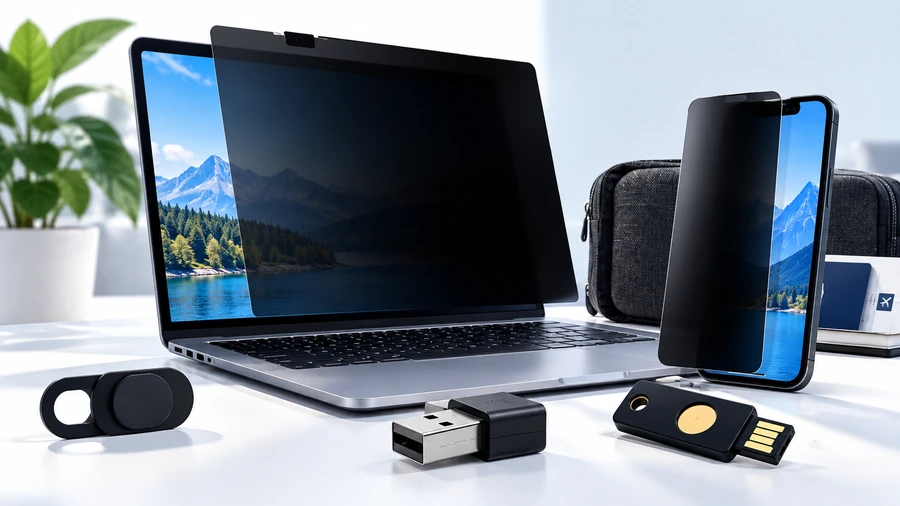
This guide covers 10 practical privacy and security gadgets available through Amazon.com, from simple webcam covers and privacy screens to USB data blockers and FIDO2 security keys. The goal is not to build a complicated security setup. It is to identify small, understandable tools that can address specific privacy or security problems.
Published: October 2, 2026
Why These Gadgets Matter
Digital privacy is often discussed as if it were one problem, but there are several different exposure points. Someone sitting beside you may be able to see a laptop display. A camera can remain physically available even when you are not using it. A public charging connection can combine power and data. And account security depends on authentication methods that are separate from search privacy.
That is why privacy products are useful when they solve a specific, understandable problem. A webcam cover does not make your computer anonymous. A privacy screen does not stop websites from tracking you. A USB data blocker does not secure your accounts. Each tool addresses one layer.
That layered approach fits naturally with our private search engines guide: protecting what you search for is one part of a broader privacy strategy.
⚡ Quick Picks
| Need | Product type | Why it is useful |
|---|---|---|
| Stop people beside you from seeing the display | Laptop privacy screen | Reduces the usable viewing angle of the screen. |
| Physically block the webcam | Webcam cover | A simple mechanical barrier when the camera is not being used. |
| Reduce unwanted USB data exchange | USB data blocker | Designed to allow charging while blocking data connections. |
| Strengthen sign-in security | FIDO2 security key | Hardware-based authentication for supported services. |
| Protect a phone display from side viewing | Phone privacy screen protector | Adds a viewing-angle filter to a device people often use in public. |
🔐 10 Privacy & Security Gadgets on Amazon
1. Laptop Privacy Screen
A laptop privacy screen is a physical filter intended to make a display harder to read from off-center angles. It is particularly relevant for coffee shops, airports, trains, offices and other places where people may sit close to your screen.
What to check: exact screen size, aspect ratio, mounting method, display type and whether you prefer a removable or permanent installation.
→ See 15.6-inch laptop privacy screens on Amazon.com (paid link)
2. Webcam Cover
A sliding webcam cover creates a physical barrier over a built-in camera when the camera is not required. The benefit is straightforward: it does not depend on an app being open or on remembering to change a software setting.
What to check: thickness, adhesive quality, whether the laptop can close normally and whether the cover fits the camera position.
→ See webcam privacy covers on Amazon.com (paid link)
3. Phone Privacy Screen Protector
Phone privacy filters use the same basic idea as laptop privacy screens but target a much smaller display. They can be useful when reading messages, email, banking information or work documents in public.
What to check: your exact phone model, case compatibility, touch sensitivity, screen clarity and whether the filter changes brightness or viewing comfort.
→ See iPhone privacy screen protectors on Amazon.com (paid link)
4. USB Data Blocker
A USB data blocker is designed to sit between a device and an unfamiliar USB power connection, allowing electrical charging while preventing normal USB data lines from being used. Consumer-protection guidance has recommended charging through a wall adapter or using a data-blocking device as one option when public USB charging is unavoidable.
The important nuance is that public-USB attack scenarios should not be treated as proof that every public charging station is compromised. CISA has noted that the existence and frequency of such attacks should be distinguished from the fact that the underlying USB capability can transfer both power and data.
What to check: connector type (USB-A, USB-C or adapter), power passthrough specifications and compatibility with your charging setup.
→ See USB data blockers on Amazon.com (paid link)
5. FIDO2 Security Key
A FIDO2 security key tackles a different privacy and security problem: account authentication. Supported services can use hardware security keys for phishing-resistant sign-in and multi-factor authentication. AWS documentation describes FIDO2 as a public-key-based standard and lists YubiKey and Feitian among compatible security-key manufacturers.
What to check: USB-C versus USB-A, NFC support, biometric features if desired, supported authentication protocols and compatibility with the specific accounts you want to protect.
→ See FIDO2 security keys on Amazon.com (paid link)
6. Monitor Privacy Screen
A privacy filter can also make sense for a desktop monitor used in an open office, reception area or shared workspace. The bigger display simply requires a different size and mounting method than a laptop.
What to check: diagonal size, 16:9 versus other aspect ratios, monitor bezels, mounting style and whether you need a removable filter.
→ See 24-inch monitor privacy screens on Amazon.com (paid link)
7. Faraday Phone Bag
A Faraday bag is designed to attenuate radio-frequency signals when a compatible device is fully enclosed. This can be useful for people who have a specific need to isolate a phone from cellular, Wi-Fi, Bluetooth or other radio communications while the device is inside the bag.
What to check: internal dimensions, closure design, which frequency ranges are covered and whether the device is completely enclosed. Do not treat a Faraday bag as protection for information already stored on the phone.
→ See Faraday phone bags on Amazon.com (paid link)
8. Tablet Privacy Screen
Tablets are often used in similarly public situations to phones and laptops. A privacy filter can reduce side-angle visibility when a tablet is used for email, documents, travel information or other sensitive material.
What to check: exact tablet model and dimensions, front-camera cutouts, case clearance and whether the filter supports the device's touch interaction.
→ See tablet privacy screens on Amazon.com (paid link)
9. USB-C Data Blocker
USB-C has become common for charging and data, which makes connector compatibility especially important. A USB-C data-blocking accessory is worth considering when your devices and travel setup are built around USB-C rather than older USB-A connections.
What to check: USB-C plug direction and fit, supported power delivery, data-blocking design and the specific device-to-charger combination you intend to use.
→ See USB-C data blockers on Amazon.com (paid link)
10. Laptop Webcam Privacy Cover
Some buyers prefer an ultra-thin webcam cover designed specifically for laptop cameras rather than a larger universal cover. This is essentially the same privacy layer as item #2, but it gives you another way to compare thickness, mounting style and pack size.
What to check: camera dimensions, cover thickness, adhesive strength and compatibility with the laptop lid.
→ See laptop webcam covers on Amazon.com (paid link)
🧭 How to Choose the Right Privacy Gadget
Start with the exposure you actually want to reduce
Ask one simple question: what can somebody see, access or connect to right now? If the answer is “my screen,” a privacy filter is relevant. If it is “my camera,” a webcam cover is the direct physical solution. If it is “my charging connection,” look at a charge-only cable or data blocker. If it is “my login,” a FIDO2 security key addresses a different layer.
Check compatibility before price
Privacy accessories are unusually sensitive to size and connector differences. A screen filter that is one inch wrong is not a bargain. A USB data blocker with the wrong connector is not useful. A security key is only valuable when it is supported by the accounts you actually plan to protect.
Prefer a clear job over a dramatic claim
Good privacy products usually have a narrow, testable purpose. Be cautious of listings that promise to make a device “unhackable,” “completely anonymous” or protected from every possible threat. Hardware can reduce a particular exposure without eliminating all other forms of risk.
⚠️ What These Gadgets Cannot Do
No accessory on this page makes a device completely private. A privacy screen does not stop websites from tracking visits. A webcam cover does not remove malware. A USB data blocker does not protect a compromised phone after it is connected by another route. A Faraday bag does not erase data from the device. A FIDO2 key does not protect an account that does not support it or a device whose recovery channels are insecure.
The strongest approach is layered: use good account authentication, keep devices updated, limit unnecessary permissions, consider tracker-blocking and privacy-friendly software, and add physical accessories where they solve a specific problem.
For the search layer, see Private Search Engines in 2026. For the broader reasons search privacy matters, read Why Search Privacy Matters More Than Ever in 2026.
🎈 More Privacy Tools on Piccard.it
Piccard.it brings together search engines and specialized tools so you can switch between services without starting from a blank page every time.
In the Piccard.it Search Hub, privacy-focused search engines are marked with a crossed-out eye icon. That visual cue makes it easier to spot privacy-oriented options while browsing the hub.
Open the Piccard.it Search Hub
🙋 Frequently Asked Questions
What is a laptop privacy screen?
A laptop privacy screen is a physical display filter designed to reduce readability from off-center angles. It is mainly useful when you work in public or shared spaces.
Do webcam covers protect against hacking?
A webcam cover physically blocks the camera lens when closed. It does not remove malware, secure the operating system or replace software updates.
What does a USB data blocker do?
A USB data blocker is designed to allow charging while blocking USB data lines. It is one physical measure that can reduce unwanted data exchange through an unfamiliar USB charging connection.
Are USB data blockers really useful?
They can be useful for a specific scenario: reducing data transfer through a USB charging connection. Official and public-sector guidance has recommended alternatives such as using your own charger with a wall outlet, a power bank or a data blocker when appropriate. CISA has also cautioned against treating alleged juice-jacking reports as proof that such attacks are widespread, so the practical point is risk reduction rather than panic.
What is a FIDO2 security key?
A FIDO2 security key is a hardware authenticator used by supported services for strong authentication. AWS describes FIDO2 as a public-key-based standard and notes that external security keys can connect through USB, Bluetooth or NFC depending on the device and configuration.
Do Faraday bags block all signals?
A properly designed and correctly closed Faraday enclosure can attenuate radio signals, but performance depends on the product, frequency and how completely the device is enclosed. It is better to treat the product as a signal-isolation tool than as a universal privacy shield.
Can I buy these products directly from Amazon.com?
Yes. The links above currently point to Amazon.com search pages rather than fixed ASINs so that this article remains easy to maintain. Before publishing, replace each search URL with the exact product or comparison link you want to monetize.
Related Articles:
Private Search Engines in 2026
Why Search Privacy Matters More Than Ever in 2026
Alternative Search Engines to Google
Best AI Search Engines for Students (2026)
Explore the Piccard.it Search Hub
